
stouputils.print module#
This module provides utility functions for printing messages with different levels of importance.
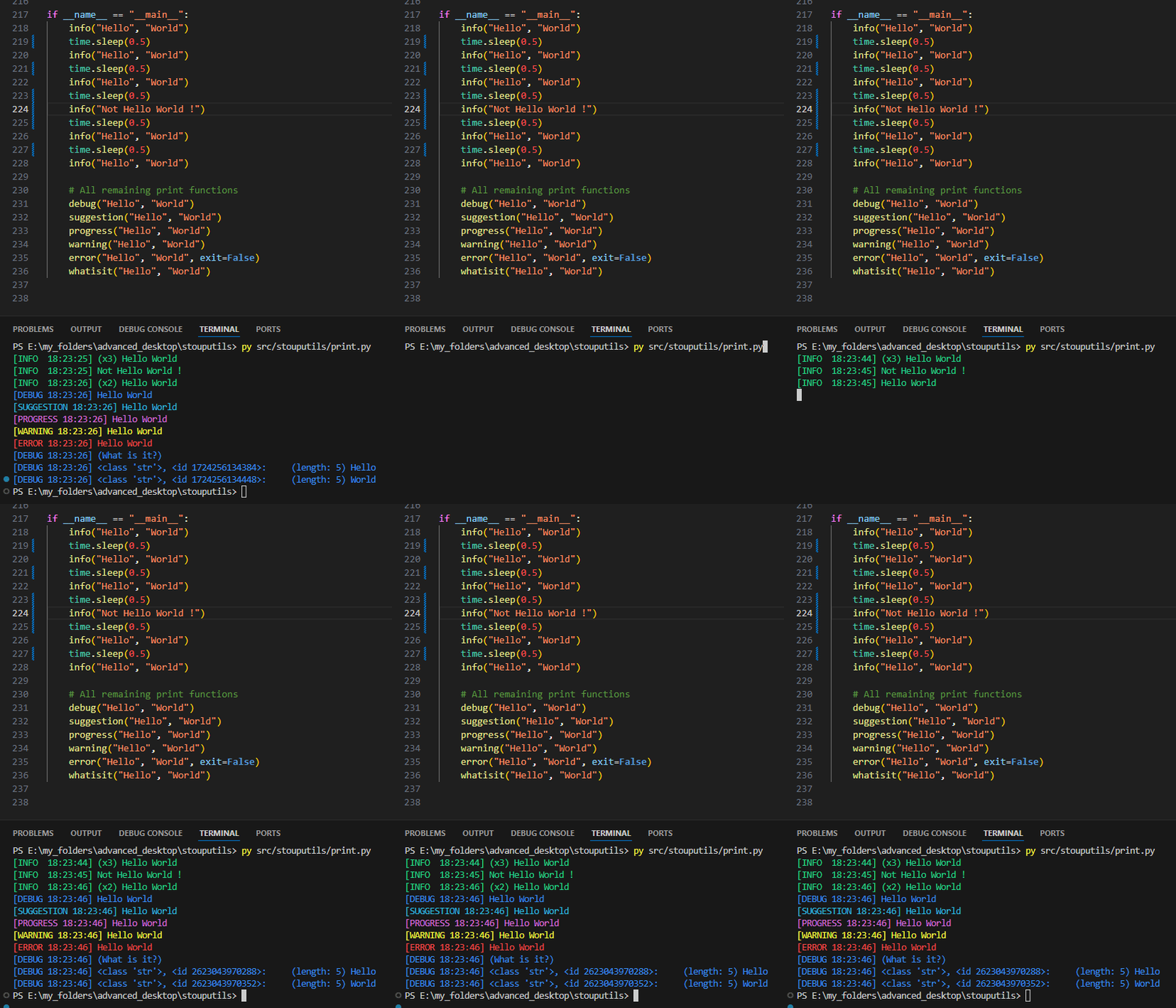
If a message is printed multiple times, it will be displayed as “(xN) message” where N is the number of times the message has been printed.
The module also includes a colored() function that formats text with Python 3.14 style coloring for file paths, line numbers, function names (in magenta), and exception names (in bold magenta). All functions have their colored counterparts with a ‘c’ suffix (e.g., infoc(), debugc(), etc.)
- colored_for_loop(
- iterable: Iterable,
- desc: str = 'Processing',
- color: str = '\x1b[95m',
- bar_format: str = '{l_bar}{bar}\x1b[95m| {n_fmt}/{total_fmt} [{rate_fmt}{postfix}, {elapsed}<{remaining}]\x1b[0m',
- ascii: bool = False,
- smooth_tqdm: bool = True,
- **kwargs: Any,
Function to iterate over a list with a colored TQDM progress bar like the other functions in this module.
- Parameters:
iterable (Iterable) – List to iterate over
desc (str) – Description of the function execution displayed in the progress bar
color (str) – Color of the progress bar (Defaults to MAGENTA)
bar_format (str) – Format of the progress bar (Defaults to BAR_FORMAT)
ascii (bool) – Whether to use ASCII or Unicode characters for the progress bar (Defaults to False)
smooth_tqdm (bool) – Whether to enable smooth progress bar updates by setting miniters=1 and mininterval=0.0 (Defaults to True)
**kwargs – Additional arguments to pass to the TQDM progress bar
- Yields:
T – Each item of the iterable
Examples
>>> for i in colored_for_loop(range(10), desc="Time sleeping loop"):
...     time.sleep(0.01)
>>> # Time sleeping loop: 100%|██████████████████| 10/10 [ 95.72it/s, 00:00<00:00]
- format_colored(*values: Any) str[source]#
Format text with Python 3.14 style colored formatting.
Dynamically colors text by analyzing each word: - File paths in magenta - Numbers in magenta - Function names (built-in and callable objects) in magenta - Exception names in bold magenta
- Parameters:
values (Any) – Values to format (like the print function)
- Returns:
The formatted text with ANSI color codes
- Return type:
str
Examples
>>> # Test function names with parentheses
>>> result = format_colored("Call print() with 42 items")
>>> result.count(MAGENTA) == 2  # print and 42
True
>>> # Test function names without parentheses
>>> result = format_colored("Use len and sum functions")
>>> result.count(MAGENTA) == 2  # len and sum
True
>>> # Test exceptions (bold magenta)
>>> result = format_colored("Got ValueError when parsing")
>>> result.count(MAGENTA) == 1 and result.count(BOLD) == 1  # ValueError in bold magenta
True
>>> # Test file paths
>>> result = format_colored("Processing ./data.csv file")
>>> result.count(MAGENTA) == 1  # ./data.csv
True
>>> # Test file paths with quotes
>>> result = format_colored('File "/path/to/script.py" line 42')
>>> result.count(MAGENTA) == 2  # /path/to/script.py and 42
True
>>> # Test numbers
>>> result = format_colored("Found 100 items and 3.14 value")
>>> result.count(MAGENTA) == 2  # 100 and 3.14
True
>>> # Test mixed content
>>> result = format_colored("Call sum() got IndexError at line 256 in utils.py")
>>> result.count(MAGENTA) == 3  # sum, IndexError (bold), and 256
True
>>> result.count(BOLD) == 1  # IndexError is bold
True
>>> # Test plain text (no coloring)
>>> result = format_colored("This is plain text")
>>> result.count(MAGENTA) == 0 and result == "This is plain text"
True
- colored(
- *values: Any,
- file: TextIO | None = None,
- **print_kwargs: Any,
Print with Python 3.14 style colored formatting.
Dynamically colors text by analyzing each word: - File paths in magenta - Numbers in magenta - Function names (built-in and callable objects) in magenta - Exception names in bold magenta
- Parameters:
values (Any) – Values to print (like the print function)
file (TextIO) – File to write the message to (default: sys.stdout)
print_kwargs (dict) – Keyword arguments to pass to the print function
Examples
>>> colored("File '/path/to/file.py', line 42, in function_name")
>>> colored("KeyboardInterrupt")
>>> colored("Processing data.csv with 100 items")
>>> colored("Using print and len functions")
- info(
- *values: Any,
- color: str = '\x1b[92m',
- text: str = 'INFO ',
- prefix: str = '',
- file: TextIO | list[TextIO] | None = None,
- use_colored: bool = False,
- **print_kwargs: Any,
Print an information message looking like “[INFO HH:MM:SS] message” in green by default.
- Parameters:
values (Any) – Values to print (like the print function)
color (str) – Color of the message (default: GREEN)
text (str) – Text of the message (default: “INFO “)
prefix (str) – Prefix to add to the values
file (TextIO|list[TextIO]) – File(s) to write the message to (default: sys.stdout)
use_colored (bool) – Whether to use the colored() function to format the message
print_kwargs (dict) – Keyword arguments to pass to the print function
- debug(
- *values: Any,
- **print_kwargs: Any,
Print a debug message looking like “[DEBUG HH:MM:SS] message” in cyan by default.
- alt_debug(
- *values: Any,
- **print_kwargs: Any,
Print a debug message looking like “[DEBUG HH:MM:SS] message” in blue by default.
- suggestion(
- *values: Any,
- **print_kwargs: Any,
Print a suggestion message looking like “[SUGGESTION HH:MM:SS] message” in cyan by default.
- progress(
- *values: Any,
- **print_kwargs: Any,
Print a progress message looking like “[PROGRESS HH:MM:SS] message” in magenta by default.
- warning(
- *values: Any,
- **print_kwargs: Any,
Print a warning message looking like “[WARNING HH:MM:SS] message” in yellow by default and in sys.stderr.
- error(
- *values: Any,
- exit: bool = False,
- **print_kwargs: Any,
Print an error message (in sys.stderr and in red by default) and optionally ask the user to continue or stop the program.
- Parameters:
values (Any) – Values to print (like the print function)
exit (bool) – Whether to ask the user to continue or stop the program, false to ignore the error automatically and continue
print_kwargs (dict) – Keyword arguments to pass to the print function
- whatisit(*values: ~typing.Any, print_function: ~collections.abc.Callable[[...], None] = <function debug>, max_length: int = 250, color: str = '\x1b[96m', **print_kwargs: ~typing.Any) None[source]#
Print the type of each value and the value itself, with its id and length/shape.
The output format is: “type, <id id_number>: (length/shape) value”
- Parameters:
values (Any) – Values to print
print_function (Callable) – Function to use to print the values (default: debug())
max_length (int) – Maximum length of the value string to print (default: 250)
color (str) – Color of the message (default: CYAN)
print_kwargs (dict) – Keyword arguments to pass to the print function
- breakpoint(*values: ~typing.Any, print_function: ~collections.abc.Callable[[...], None] = <function warning>, **print_kwargs: ~typing.Any) None[source]#
Breakpoint function, pause the program and print the values.
- Parameters:
values (Any) – Values to print
print_function (Callable) – Function to use to print the values (default: warning())
print_kwargs (dict) – Keyword arguments to pass to the print function
- class TeeMultiOutput(
- *files: IO[Any],
- strip_colors: bool = True,
- ascii_only: bool = True,
- ignore_lineup: bool = True,
Bases:
objectFile-like object that duplicates output to multiple file-like objects.
- Parameters:
*files (IO[Any]) – One or more file-like objects that have write and flush methods
strip_colors (bool) – Strip ANSI color codes from output sent to non-stdout/stderr files
ascii_only (bool) – Replace non-ASCII characters with their ASCII equivalents for non-stdout/stderr files
ignore_lineup (bool) – Ignore lines containing LINE_UP escape sequence in non-terminal outputs
Examples
>>> f = open("logfile.txt", "w")
>>> sys.stdout = TeeMultiOutput(sys.stdout, f)
>>> print("Hello World")  # Output goes to both console and file
Hello World
>>> f.close()   # TeeMultiOutput will handle any future writes to closed files gracefully
- files: tuple[IO[Any], ...]#
File-like objects to write to
- strip_colors: bool#
Whether to strip ANSI color codes from output sent to non-stdout/stderr files
- ascii_only: bool#
Whether to replace non-ASCII characters with their ASCII equivalents for non-stdout/stderr files
- ignore_lineup: bool#
Whether to ignore lines containing LINE_UP escape sequence in non-terminal outputs
- property encoding: str#
Get the encoding of the first file, or “utf-8” as fallback.
- Returns:
The encoding, ex: “utf-8”, “ascii”, “latin1”, etc.
- Return type:
str