
🚚 continuous_delivery#
Continuous delivery and deployment utilities.
This module provides tools for automating software delivery and deployment:
Key Features: - GitHub release management and uploads - GitLab release management and uploads - PyPI package publishing utilities - pyproject.toml file management - Common CD/CI utilities - Local git changelog generation
Components:
cd_utils: Common utilities for continuous deliverygit: Local git changelog utilities (generate_local_changelog(),changelog_cli())github: GitHub-specific utilities (upload_to_github())gitlab: GitLab-specific utilities (upload_to_gitlab())pypi: PyPI publishing tools (pypi_full_routine())pyproject: pyproject.toml file management
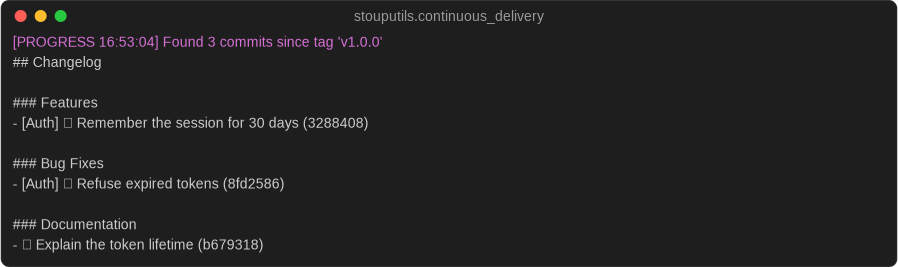
# Create a git repository with a release tag and three commits after it
git init -q project && cd project
git commit -q --allow-empty -m "feat: ✨ Add the login page"
git tag -m "First release" v1.0.0
git commit -q --allow-empty -m "feat(auth): ✨ Remember the session for 30 days"
git commit -q --allow-empty -m "fix(auth): 🐛 Refuse expired tokens"
git commit -q --allow-empty -m "docs: 📝 Explain the token lifetime"

# Build the changelog of everything since the tag, grouped by commit type
stouputils changelog tag v1.0.0
🔧 cd_utils#
This module contains utilities for continuous delivery, such as loading credentials from a file.
It is mainly used by the github module.
- parse_commit_message(
- message: str,
Parse a commit message following the conventional commits convention.
Convention format: <type>: <description> or <type>(<sub-category>): <description>
- Parameters:
message – The commit message to parse (first line only)
- Returns:
The commit type (e.g. “Features” or “Bug Fixes”), its description, its sub-category or None (e.g. “Project”), and whether it is a breaking change, marked by
!.
>>> parse_commit_message("feat: Add new feature")
('Features', 'Add new feature', None, False)
>>> parse_commit_message("fix(API): Fix bug in endpoint")
('Bug Fixes', 'Fix bug in endpoint', 'API', False)
>>> parse_commit_message("feat!: Breaking change")
('Features', 'Breaking change', None, True)
>>> parse_commit_message("docs(README): Update documentation")
('Documentation', 'Update documentation', 'README', False)
>>> parse_commit_message("chore: Cleanup code")
('Chores', 'Cleanup code', None, False)
>>> parse_commit_message("refactor(core): Refactor module")
('Code Refactoring', 'Refactor module', 'core', False)
>>> parse_commit_message("No conventional format")
('Other', 'No conventional format', None, False)
>>> parse_commit_message("build!: Major build change")
('Build System', 'Major build change', None, True)
>>> parse_commit_message("wip: Work in progress")
('Work in Progress', 'Work in progress', None, False)
>>> parse_commit_message("unknown_type: Some description")
('Unknowntype', 'Some description', None, False)
- format_changelog(
- commits: list[tuple[str, str]],
- url_formatter: Callable[[str], str] | None = None,
- latest_tag_version: str | None = None,
- current_version: str | None = None,
- compare_url_formatter: Callable[[str, str], str] | None = None,
Generate a changelog from a list of commits.
- Parameters:
commits – List of (sha, message) tuples
url_formatter – Function to format commit URLs. Takes a SHA and returns a URL string. If None, commits show only short SHA.
latest_tag_version – Start of the comparison link, passed as is to compare_url_formatter
current_version – End of the comparison link, passed as is to compare_url_formatter
compare_url_formatter – Function to format comparison URL. Takes (old_version, new_version) and returns a URL string.
- Returns:
Generated changelog in Markdown format
- format_sub_category(sub_category: str) str[source]#
A commit scope as the changelog shows it, every word capitalized without lowering any other letter.
>>> format_sub_category("cd_utils"), format_sub_category("mlFlow")
('Cd Utils', 'MlFlow')
- load_credentials(
- credentials_path: str,
Load credentials from a JSON or YAML file into a dictionary.
Loads credentials from either a JSON or YAML file and returns them as a dictionary. The file must contain the required credentials in the appropriate format.
- Parameters:
credentials_path – Path to the credentials file (.json or .yml)
- Returns:
Dictionary containing the credentials
Example JSON format:
{
    "github": {
        "username": "Stoupy51",
        "api_key": "ghp_XXXXXXXXXXXXXXXXXXXXXXXXXX"
    },
    "gitlab": {
        "api_key": "glpat-XXXXXXXXXXXXXXXXXXXXXXXXXX",
        "url": "https://gitlab.com"  // Optional: can also be passed as parameter to upload_to_gitlab()
    }
}
Example YAML format:
github:
    username: "Stoupy51"
    api_key: "ghp_XXXXXXXXXXXXXXXXXXXXXXXXXX"
gitlab:
    api_key: "glpat-XXXXXXXXXXXXXXXXXXXXXXXXXX"
    url: "https://gitlab.com"  # Optional: can also be passed as parameter to upload_to_gitlab()
- handle_response(
- response: requests.Response,
- error_message: str,
Handle a response from the API by raising an error if the response is not successful (status code not in 200-299).
- Parameters:
response – The response from the API
error_message – The error message to raise if the response is not successful
- clean_version(version: str, keep: str = '') str[source]#
Clean a version string
- Parameters:
version – The version string to clean
keep – The characters to keep in the version string
- Returns:
The cleaned version string
>>> clean_version("v1.e0.zfezf0.1.2.3zefz")
'1.0.0.1.2.3'
>>> clean_version("v1.e0.zfezf0.1.2.3zefz", keep="v")
'v1.0.0.1.2.3'
>>> clean_version("v1.2.3b", keep="ab")
'1.2.3b'
- version_to_float(
- version: str,
- error: bool = True,
Converts a version string into a float for comparison purposes. The version string is expected to follow the format of major.minor.patch.something_else…., where each part is separated by a dot and can be extended indefinitely. Supports pre-release suffixes with numbers: devN/dN (dev), aN (alpha), bN (beta), rcN/cN (release candidate). Ordering: 1.0.0 > 1.0.0rc2 > 1.0.0rc1 > 1.0.0b2 > 1.0.0b1 > 1.0.0a2 > 1.0.0a1 > 1.0.0dev1
- Parameters:
version – The version string to convert. (e.g. “v1.0.0.1.2.3”, “v2.0.0b2”, “v1.0.0rc1”)
error – Return None on error instead of raising an exception
- Returns:
The float representation of the version. (e.g. 0)
>>> version_to_float("v1.0.0")
1.0
>>> version_to_float("v1.0.0.1")
1.000000001
>>> version_to_float("v2.3.7")
2.003007
>>> version_to_float("v1.0.0.1.2.3")
1.0000000010020031
>>> version_to_float("v2.0") > version_to_float("v1.0.0.1")
True
>>> version_to_float("v2.0.0") > version_to_float("v2.0.0rc") > version_to_float("v2.0.0b")
True
>>> version_to_float("v2.0.0b") > version_to_float("v2.0.0a") > version_to_float("v2.0.0dev")
True
>>> version_to_float("v1.0.0b") > version_to_float("v1.0.0a")
True
>>> version_to_float("v1.0.0") > version_to_float("v1.0.0b")
True
>>> version_to_float("v3.0.0a") > version_to_float("v2.9.9")
True
>>> version_to_float("v1.2.3b") < version_to_float("v1.2.3")
True
>>> version_to_float("1.0.0") == version_to_float("v1.0.0")
True
>>> version_to_float("2.0.0.0.0.0.1b") > version_to_float("2.0.0.0.0.0.1a")
True
>>> version_to_float("2.0.0.0.0.0.1") > version_to_float("2.0.0.0.0.0.1b")
True
>>> version_to_float("v1.0.0rc") == version_to_float("v1.0.0c")
True
>>> version_to_float("v1.0.0c") > version_to_float("v1.0.0b")
True
>>> version_to_float("v1.0.0d") < version_to_float("v1.0.0a")
True
>>> version_to_float("v1.0.0dev") < version_to_float("v1.0.0a")
True
>>> version_to_float("v1.0.0dev") == version_to_float("v1.0.0d")
True
>>> version_to_float("v1.0.0rc2") > version_to_float("v1.0.0rc1")
True
>>> version_to_float("v1.0.0b2") > version_to_float("v1.0.0b1")
True
>>> version_to_float("v1.0.0a2") > version_to_float("v1.0.0a1")
True
>>> version_to_float("v1.0.0dev2") > version_to_float("v1.0.0dev1")
True
>>> version_to_float("v1.0.0") > version_to_float("v1.0.0rc2") > version_to_float("v1.0.0rc1")
True
>>> version_to_float("v1.0.0rc1") > version_to_float("v1.0.0b2")
True
>>> version_to_float("v1.0.0b1") > version_to_float("v1.0.0a2")
True
>>> version_to_float("v1.0.0a1") > version_to_float("v1.0.0dev2")
True
>>> version_to_float("5.9.2-SNAPSHOT+1006") > version_to_float("5.9.2-SNAPSHOT+1005")
True
>>> version_to_float("5.10.1-SNAPSHOT+1010") > version_to_float("5.9.2-SNAPSHOT+1005")
True
>>> versions = ["v1.0.0", "v1.0.0rc2", "v1.0.0rc1", "v1.0.0b2", "v1.0.0b1", "v1.0.0a2", "v1.0.0a1", "v1.0.0dev2", "v1.0.0dev1"]
>>> sorted_versions = sorted(versions, key=version_to_float, reverse=True)
>>> sorted_versions == versions
True
📜 git#
This module contains utilities for generating changelogs from local git repositories.
changelog_cli: CLI interface for generating changelogs from local git history
get_commits_since_tag: Get all commits since a specific tag
get_commits_since_date: Get all commits since a specific date
get_commits_since_commit: Get all commits since a specific commit
parse_remote_url: Parse a git remote URL to extract the base URL for commit links
Usage: - stouputils changelog [tag|date|commit] [value] [–remote <remote>] [-o <file>]
stouputils changelog # Uses latest tag (default)
stouputils changelog tag v1.9.0 # All commits since tag v1.9.0
stouputils changelog date 2026/01/05 # All commits since date
stouputils changelog commit 847b27e # All commits since commit
stouputils changelog –remote origin # Use origin remote for commit URLs
stouputils changelog -o CHANGELOG.md # Output to file
- run_git_command(
- args: list[str],
- cwd: str | None = None,
Run a git command and return the output.
- Parameters:
args – Git command arguments (without ‘git’ prefix)
cwd – Working directory for the command
- Returns:
Command output (stdout)
- Raises:
RuntimeError – If the git command fails
- get_local_tags(
- cwd: str | None = None,
Get all tags from the local git repository, sorted by version.
- Parameters:
cwd – Working directory for the git command
- Returns:
List of (tag_name, commit_sha) tuples, sorted by version (newest first)
- get_latest_tag(
- cwd: str | None = None,
- exclude_version: str | None = None,
Get the latest tag from the local git repository.
- Parameters:
cwd – Working directory for the git command
exclude_version – Version to exclude from the search
- Returns:
(tag_name, commit_sha) or (None, None) if no tags exist
- get_commits_since_tag(
- tag: str,
- cwd: str | None = None,
Get all commits since a specific tag.
- Parameters:
tag – Tag name to start from (exclusive)
cwd – Working directory for the git command
- Returns:
List of (sha, message) tuples
- get_commits_since_date(
- date_str: str,
- cwd: str | None = None,
Get all commits since a specific date.
- Parameters:
date_str – Date string (supports multiple formats via dateutil)
cwd – Working directory for the git command
- Returns:
List of (sha, message) tuples
- get_commits_since_commit(
- commit_sha: str,
- cwd: str | None = None,
Get all commits since a specific commit (exclusive).
- Parameters:
commit_sha – Commit SHA to start from (this commit is excluded)
cwd – Working directory for the git command
- Returns:
List of (sha, message) tuples
- parse_date_fallback(date_str: str) str[source]#
Parse a date string without dateutil, trying common formats.
- Parameters:
date_str – Date string to parse
- Returns:
ISO 8601 formatted date string
- Raises:
ValueError – If the date cannot be parsed
>>> parse_date_fallback("2026/01/15")
'2026-01-15T00:00:00'
>>> parse_date_fallback("2026-01-15")
'2026-01-15T00:00:00'
>>> parse_date_fallback("2026-01-15 14:30:00")
'2026-01-15T14:30:00'
>>> parse_date_fallback("2026-01-15T14:30:00")
'2026-01-15T14:30:00'
- parse_commit_log(output: str) list[tuple[str, str]][source]#
Parse git log output into a list of (sha, message) tuples.
- Parameters:
output – Output from git log command
- Returns:
List of (sha, full_message) tuples
- get_remotes(cwd: str | None = None) dict[str, str][source]#
Get all git remotes and their URLs.
- Parameters:
cwd – Working directory for the git command
- Returns:
Dictionary mapping remote names to their push URLs
- parse_remote_url(
- remote_url: str,
Parse a git remote URL to extract hosting info.
Supports: - SSH format: git@github.com:user/repo.git - SSH format: git@gitlab.example.com:group/repo.git - HTTPS format: https://github.com/user/repo.git - HTTPS format: https://gitlab.example.com/group/repo.git
- Parameters:
remote_url – Git remote URL
- Returns:
- (host_type, base_url, repo_path) or None if cannot parse
host_type: host_type: “github”, “gitlab”, or “unknown” base_url: Base URL for the repository (e.g., “https://github.com/user/repo”) repo_path: Repository path (e.g., “user/repo”)
>>> parse_remote_url("git@github.com:Stoupy51/stouputils.git")
('github', 'https://github.com/Stoupy51/stouputils', 'Stoupy51/stouputils')
>>> parse_remote_url("https://github.com/Stoupy51/stouputils.git")
('github', 'https://github.com/Stoupy51/stouputils', 'Stoupy51/stouputils')
>>> parse_remote_url("git@gitlab.example.com:group/project.git")
('gitlab', 'https://gitlab.example.com/group/project', 'group/project')
>>> parse_remote_url("https://gitlab.company.com/team/repo.git")
('gitlab', 'https://gitlab.company.com/team/repo', 'team/repo')
>>> parse_remote_url("git@custom-server.com:user/repo.git")
('gitlab', 'https://custom-server.com/user/repo', 'user/repo')
>>> parse_remote_url("invalid-url") is None
True
- detect_host_type(host: str) str[source]#
Detect the type of git hosting service from hostname.
- Parameters:
host – Hostname (e.g., “github.com”, “gitlab.example.com”)
- Returns:
“github”, “gitlab”, or “unknown”
>>> detect_host_type("github.com")
'github'
>>> detect_host_type("gitlab.com")
'gitlab'
>>> detect_host_type("gitlab.example.com")
'gitlab'
>>> detect_host_type("custom-server.com")
'gitlab'
>>> detect_host_type("my-github-mirror.org")
'github'
- create_url_formatter(
- remote_url: str,
Create URL formatter functions for a git remote.
- Parameters:
remote_url – Git remote URL
- Returns:
- (commit_url_formatter, compare_url_formatter) or None.
The compare formatter takes two git refs as they are, a tag name or a commit SHA.
>>> commit_url, compare_url = create_url_formatter("git@github.com:Stoupy51/stouputils.git")
>>> commit_url("847b27e")
'https://github.com/Stoupy51/stouputils/commit/847b27e'
>>> compare_url("v1.9.0", "847b27e")
'https://github.com/Stoupy51/stouputils/compare/v1.9.0...847b27e'
- generate_local_changelog(
- mode: str = 'tag',
- value: str | None = None,
- remote: str | None = None,
- cwd: str | None = None,
Generate a changelog from local git history.
- Parameters:
mode – Mode for selecting commits - “tag”, “date”, or “commit”
value – Value for the mode (tag name, date, or commit SHA). If None and mode is “tag”, uses the latest tag.
remote – Remote name to use for commit URLs. If None, no URLs are generated.
cwd – Working directory for git commands
- Returns:
Generated changelog in Markdown format
- local_commits(
- mode: str,
- value: str | None,
- cwd: str | None,
The commits a local changelog covers, and the git ref its comparison link starts from.
- Parameters:
mode – “tag”, “date” or “commit”.
value – Tag name, date or commit SHA, the latest tag being used when None in “tag” mode.
- Returns:
The
(sha, message)commits, and the starting tag or commit, None in “date” mode or when the repository has no tag.- Raises:
ValueError – If the mode is unknown, or its value missing in “date” and “commit” modes.
- remote_url_formatters(
- remote: str | None,
- cwd: str | None,
The commit and comparison URL formatters of a git remote, both None without a remote or when it cannot be read.
- changelog_cli() None[source]#
CLI interface for generating changelogs from local git history.
Usage:
stouputils changelog [tag|date|commit] [value] [--remote <remote>] [-o <file>]
stouputils changelog                          # Uses latest tag (default)
stouputils changelog tag v1.9.0               # All commits since tag v1.9.0
stouputils changelog date 2026/01/05          # All commits since date
stouputils changelog commit 847b27e           # All commits since commit
stouputils changelog --remote origin          # Use origin remote for commit and comparison URLs
stouputils changelog -o CHANGELOG.md          # Output to file
📦 github#
This module contains utilities for continuous delivery on GitHub.
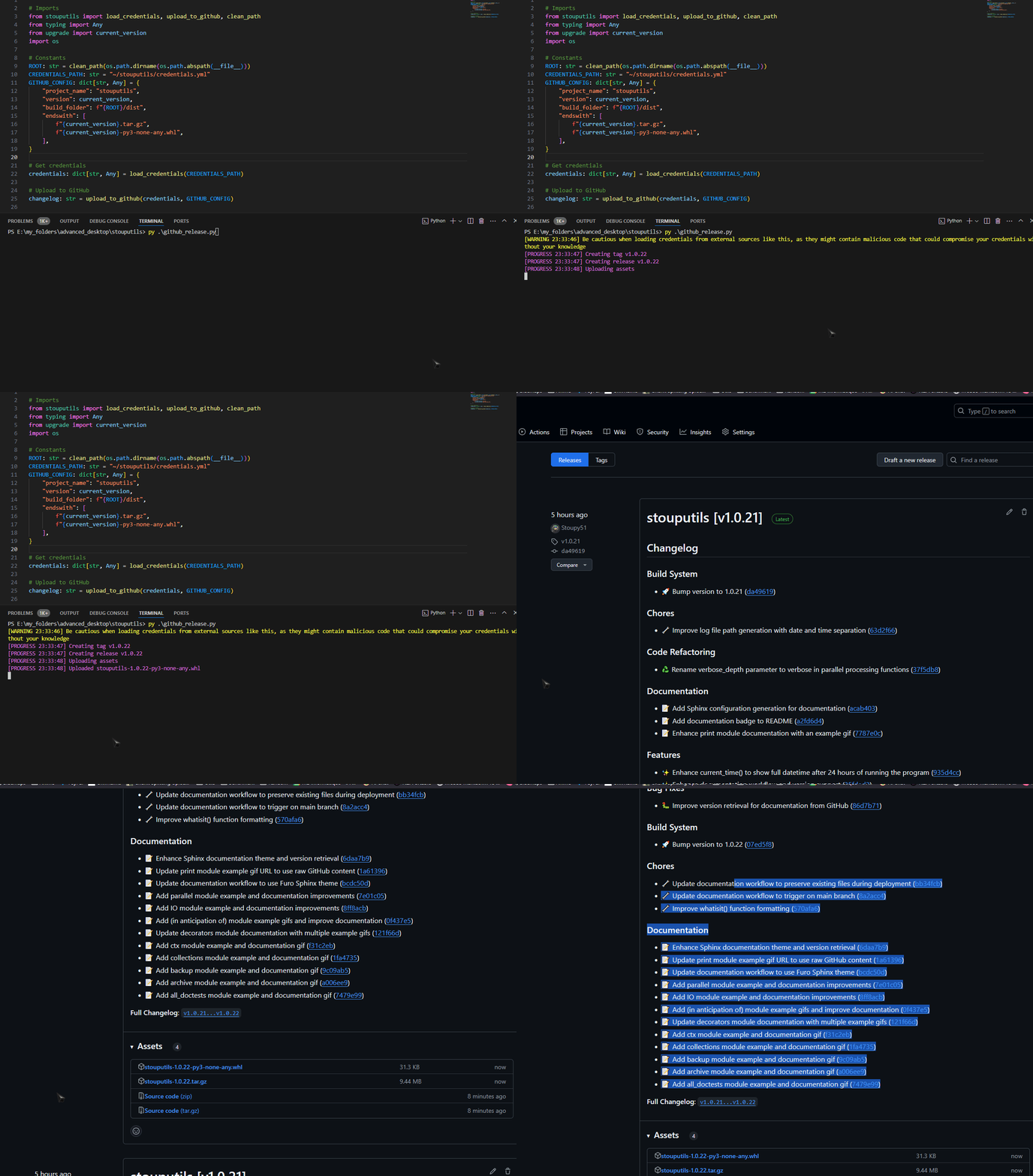
upload_to_github: Upload the project to GitHub using the credentials and the configuration (make a release and upload the assets, handle existing tag, generate changelog, etc.)
- UPLOAD_ATTEMPTS: int = 4[source]#
How many times an asset upload is tried before the release is given up on.
- UPLOAD_RETRY_DELAY: float = 2.0[source]#
Seconds before the first retry, doubled after every failed attempt.
- validate_github_credentials(
- credentials: dict[str, dict[str, str]],
Get and validate GitHub credentials.
- Parameters:
credentials – Credentials dictionary with ‘github’ key containing ‘api_key’ and ‘username’
- Returns:
(owner username, headers dict)
- Raises:
ValueError – If required keys are missing
- validate_github_config(
- github_config: dict[str, Any],
Validate GitHub configuration.
- Parameters:
github_config – Configuration dictionary
- Returns:
(project_name, version, build_folder, endswith list)
- Raises:
ValueError – If required keys are missing
- build_github_config(
- owner: str,
- headers: dict[str, str],
- project_name: str,
- version: str,
- build_folder: str,
- endswith: list[str],
- api_url: str,
Build a PlatformConfig for GitHub.
- Parameters:
owner – GitHub username
headers – HTTP headers with authorization
project_name – Name of the repository
version – Version to release
build_folder – Path to build assets
endswith – File suffixes to upload
api_url – GitHub API URL
- Returns:
Configuration for GitHub release
- delete_github_release(
- config: PlatformConfig,
Delete every existing GitHub release for the configured version, drafts included.
- delete_github_tag(
- config: PlatformConfig,
Delete existing GitHub tag for the configured version.
- get_github_commit_date(
- commit: dict[str, Any],
Extract date from a GitHub commit response.
- extract_github_commit_data(
- commits: list[dict[str, Any]],
Extract (sha, message) tuples from GitHub commits.
- get_pushed_head_sha(
- config: PlatformConfig,
SHA of the local HEAD commit, which the release is tagged on.
GitHub can only tag a commit it already has, so the upload stops when HEAD is not pushed yet. It exits instead of raising, since upload_to_github swallows exceptions and the next platforms would still upload.
- create_github_tag(
- config: PlatformConfig,
- commit_sha: str,
Create a new tag on GitHub, pointing to the given commit.
- create_github_release(
- config: PlatformConfig,
- changelog: str,
Create a new GitHub release and return its ID.
- Parameters:
config – Platform configuration
changelog – Changelog text for the release body
- Returns:
Release ID for asset uploads
- upload_github_assets(
- config: PlatformConfig,
- release_id: int,
Upload release assets to GitHub.
- Parameters:
config – Platform configuration
release_id – ID of the release to upload assets to
- upload_to_github(
- credentials: dict[str, Any],
- github_config: dict[str, Any],
- api_url: str = 'https://api.github.com',
Upload the project to GitHub using the credentials and the configuration.
- Parameters:
credentials – Credentials for the GitHub API
github_config – Configuration for the GitHub project
api_url – GitHub API URL (default: https://api.github.com)
- Returns:
Generated changelog text
> upload_to_github(
    credentials={
        "github": {
            "api_key": "ghp_...",
            "username": "Stoupy"
        }
    },
    github_config={
        "project_name": "stouputils",
        "version": "1.0.0",
        "build_folder": "build",
        "endswith": [".zip"]
    }
)
📦 gitlab#
This module contains utilities for continuous delivery on GitLab.
upload_to_gitlab: Upload the project to GitLab using the credentials and the configuration (make a release and upload the assets, handle existing tag, generate changelog, etc.)
- validate_gitlab_credentials(
- credentials: dict[str, dict[str, str]],
- gitlab_url: str,
Get and validate GitLab credentials.
- Parameters:
credentials – Credentials dictionary with ‘gitlab’ key containing ‘api_key’
gitlab_url – Default GitLab instance URL
- Returns:
(gitlab_url, headers dict)
- Raises:
ValueError – If required keys are missing
- validate_gitlab_config(
- gitlab_config: dict[str, Any],
Validate GitLab configuration.
- Parameters:
gitlab_config – Configuration dictionary
- Returns:
(project_path, version, build_folder, endswith list)
- Raises:
ValueError – If required keys are missing
- build_gitlab_config(
- gitlab_url: str,
- headers: dict[str, str],
- project_path: str,
- version: str,
- build_folder: str,
- endswith: list[str],
Build a PlatformConfig for GitLab.
- Parameters:
gitlab_url – GitLab instance URL
headers – HTTP headers with authorization
project_path – Full project path (e.g., “namespace/project”)
version – Version to release
build_folder – Path to build assets
endswith – File suffixes to upload
- Returns:
Configuration for GitLab release
- delete_gitlab_release(
- config: PlatformConfig,
Delete existing GitLab release for the configured version.
- delete_gitlab_tag(
- config: PlatformConfig,
Delete existing GitLab tag for the configured version.
- get_gitlab_commit_date(
- commit: dict[str, Any],
Extract date from a GitLab commit response.
- extract_gitlab_commit_data(
- commits: list[dict[str, Any]],
Extract (sha, message) tuples from GitLab commits.
- create_gitlab_tag(
- config: PlatformConfig,
Create a new tag on GitLab.
- create_gitlab_release(
- config: PlatformConfig,
- changelog: str,
- asset_links: list[dict[str, str]],
Create a new GitLab release.
- Parameters:
config – Platform configuration
changelog – Changelog text for the release description
asset_links – List of GitLab release asset links
- upload_gitlab_assets(
- config: PlatformConfig,
Upload release assets to GitLab via Generic Package Registry and return release links.
- Parameters:
config – Platform configuration
- Returns:
List of GitLab release asset links suitable for the release payload.
- upload_to_gitlab(
- credentials: dict[str, Any],
- gitlab_config: dict[str, Any],
- gitlab_url: str = 'https://gitlab.com',
Upload the project to GitLab using the credentials and the configuration.
- Parameters:
credentials – Credentials for the GitLab API
gitlab_config – Configuration for the GitLab project
gitlab_url – GitLab instance URL (default: https://gitlab.com)
- Returns:
Generated changelog text
> upload_to_gitlab(
    credentials={
        "gitlab": {
            "api_key": "glpat-...",
        }
    },
    gitlab_config={
        "project_path": "DataScience/chestia",
        "version": "1.0.0",
        "build_folder": "dist",
        "endswith": [".tar.gz", ".whl"]
    },
    gitlab_url="https://gitlab.example.com"
)
📦 pypi#
This module contains utilities for PyPI. (Using build and twine packages)
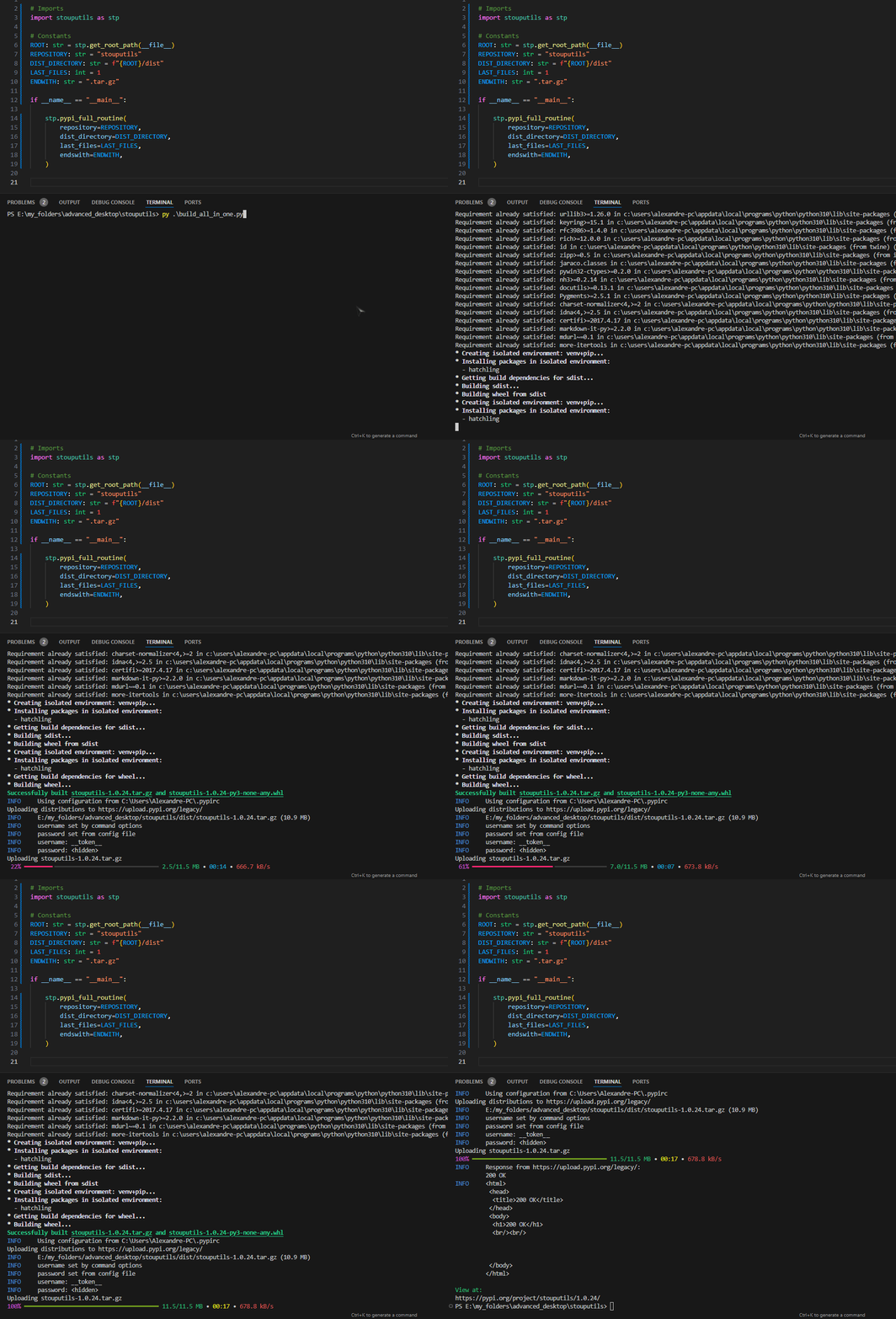
pypi_full_routine: Upload the most recent file(s) to PyPI after updating pip and building the package (using build and twine)
pypi_full_routine_using_uv: Full build and publish routine using ‘uv’ command line tool
- update_pip_and_required_packages() int[source]#
Update pip and required packages. :returns: Return code of the subprocess.run call.
- upload_package(repository: str, filepath: str) int[source]#
Upload the package to PyPI.
- Parameters:
repository – Repository to upload to.
filepath – Path to the file to upload.
- Returns:
Return code of the subprocess.run call.
- pypi_full_routine(repository: str, dist_directory: str, last_files: int = 1, endswith: str = '.tar.gz', update_all_function: ~collections.abc.Callable[[], int] = <function update_pip_and_required_packages>, build_package_function: ~collections.abc.Callable[[], int] = <function build_package>, upload_package_function: ~collections.abc.Callable[[str, str], int] = <function upload_package>) None[source]#
Upload the most recent file(s) to PyPI after updating pip and required packages and building the package.
- Parameters:
repository – Repository to upload to.
dist_directory – Directory to upload from.
last_files – Number of most recent files to upload. Defaults to 1.
endswith – End of the file name to upload. Defaults to “.tar.gz”.
update_all_function – Function to update pip and required packages. Defaults to
update_pip_and_required_packages().build_package_function – Function to build the package. Defaults to
build_package().upload_package_function – Function to upload the package. Defaults to
upload_package().
- Returns:
Return code of the command.
- pypi_full_routine_using_uv() None[source]#
Full build and publish routine using ‘uv’ command line tool.
- Steps:
Increment version in pyproject.toml (patch by default, or ‘minor’ or ‘major’ when passed as last argument)
Build the package using ‘uv build’
Upload the most recent file to PyPI using ‘uv publish’, only when ‘–publish’ is passed
📝 pyproject#
Utilities for reading, writing and managing pyproject.toml files.
This module provides functions to handle pyproject.toml files, including reading, writing, version management and TOML formatting capabilities.
read_pyproject(): Read the pyproject.toml file.write_pyproject(): Write to the pyproject.toml file.format_toml_lists(): Format TOML lists with proper indentation.increment_version_from_input(): Increment the patch version number.increment_version_from_pyproject(): Increment version in pyproject.toml.get_version_from_pyproject(): Get version from pyproject.toml.
- ONE_LINE_LIST: Pattern[str] = re.compile('^([^=\\[\\]]*)=\\s*\\[([^\\[\\]]*)\\]\\s*$')[source]#
A
key = [...]line holding a whole list, the only shapeformat_toml_lists()rewrites.
- read_pyproject(
- pyproject_path: str,
Read the pyproject.toml file.
- Parameters:
pyproject_path – Path to the pyproject.toml file.
- Returns:
The content of the pyproject.toml file.
>>> content = read_pyproject("pyproject.toml")
>>> "." in content["project"]["version"]
True
- format_toml_lists(content: str) str[source]#
Format TOML lists with indentation.
- Parameters:
content – The content of the pyproject.toml file.
- Returns:
The formatted content with properly indented lists.
>>> toml_content = '''[project]
... dependencies = [ "tqdm>=4.0.0", "requests>=2.20.0", "pyyaml>=6.0.0", ]'''
>>> format_toml_lists(toml_content).replace("\t", "    ") == '''[project]
... dependencies = [
...     "tqdm>=4.0.0",
...     "requests>=2.20.0",
...     "pyyaml>=6.0.0",
... ]'''
True
>>> format_toml_lists('dependencies = []\nreadme = "README.md"')
'dependencies = []\nreadme = "README.md"'
- write_pyproject(
- path: str,
- content: dict[str, Any],
Write to the pyproject.toml file with properly indented lists.
- Parameters:
path – Path to the pyproject.toml file.
content – Content to write to the pyproject.toml file.
- increment_version_from_input(version: str) str[source]#
Increment the version.
- Parameters:
version – The version to increment. (ex: “0.1.0”)
- Returns:
“0.1.1”)
- Return type:
The incremented version. (ex
>>> increment_version_from_input("0.1.0")
'0.1.1'
>>> increment_version_from_input("1.2.9")
'1.2.10'
- increment_version_from_pyproject(path: str) None[source]#
Increment the version in the pyproject.toml file.
- Parameters:
path – Path to the pyproject.toml file.
import stouputils as stp

stp.write_pyproject("pyproject.toml", {"project": {"name": "my_package", "version": "1.0.27"}})

# Each call bumps the last number of the version
for _ in range(3):
    stp.increment_version_from_pyproject("pyproject.toml")
    stp.info("Version is now", stp.get_version_from_pyproject("pyproject.toml"))

release_common#
This module contains shared utilities for release management on Git hosting platforms.
It provides common functionality used by both GitHub and GitLab modules.
- class PlatformConfig(
- base_url: str,
- project_identifier: str,
- headers: dict[str, str],
- version: str,
- build_folder: str,
- endswith: list[str],
- project_api_url: str,
- web_url: str,
- tag_api_path: str = '',
- commit_api_path: str = '',
- release_api_path: str = '/releases',
- commit_url_path: str = '',
- compare_url_path: str = '',
- platform_name: str = '',
- files: list[str] | None = None,
Bases:
objectConfiguration for a Git hosting platform release.
- base_url: str[source]#
Base URL of the platform (e.g., “https://api.github.com” or “https://gitlab.com”)
- project_identifier: str[source]#
Project identifier (e.g., “owner/repo” for GitHub, “namespace/project” for GitLab)
- validate_required_keys(
- config: dict[str, Any],
- required_keys: list[str],
- config_name: str,
Validate that required keys exist in a configuration dictionary.
- Parameters:
config – Configuration dictionary to validate
required_keys – List of required key names
config_name – Name of the configuration (for error messages)
- Raises:
ValueError – If any required key is missing
- check_existing_tag(
- config: PlatformConfig,
- tag_url: str,
Check if a tag exists.
- Parameters:
config – Platform configuration
tag_url – URL to check for tag existence
- Returns:
True if tag exists
- prompt_delete_existing(
- config: PlatformConfig,
- delete_release_func: Callable[[PlatformConfig], None],
- delete_tag_func: Callable[[PlatformConfig], None],
Prompt user to delete existing tag and release.
- Parameters:
config – Platform configuration
delete_release_func – Function to delete the release
delete_tag_func – Function to delete the tag
- Returns:
True if user chose to delete, False otherwise
- handle_existing_tag(
- config: PlatformConfig,
- tag_url: str,
- delete_tag_func: Callable[[PlatformConfig], None],
- delete_release_func: Callable[[PlatformConfig], None],
Check if tag exists and handle deletion if needed.
- Parameters:
config – Platform configuration
tag_url – URL to check if tag exists
delete_tag_func – Function to delete the tag
delete_release_func – Function to delete the release
- Returns:
True if we can proceed with creating the release
- fetch_latest_tag(
- config: PlatformConfig,
- sha_extractor: Callable[[dict[str, Any]], str],
Get latest tag information.
- Parameters:
config – Platform configuration
sha_extractor – Function to extract SHA from a tag dict
- Returns:
(sha, version) or (None, None)
- paginate_api(
- url: str,
- headers: dict[str, str],
- params: dict[str, str],
- per_page: int = 100,
Paginate through all results from an API endpoint.
- Parameters:
url – API URL
headers – HTTP headers
params – Query parameters
per_page – Number of items per page
- Returns:
All results from all pages
- fetch_commits_since_tag(
- config: PlatformConfig,
- latest_tag_sha: str | None,
- date_extractor: Callable[[dict[str, Any]], str],
Get commits since last tag.
- Parameters:
config – Platform configuration
latest_tag_sha – SHA of the latest tag commit (or None)
date_extractor – Function to extract date from a commit dict
- Returns:
List of commits since the tag
- generate_changelog(
- commits: list[tuple[str, str]],
- config: PlatformConfig,
- latest_tag_version: str | None,
Generate changelog from commits using platform-specific URL patterns.
- Parameters:
commits – List of (sha, message) tuples
config – Platform configuration
latest_tag_version – Previous version for comparison link
- Returns:
Generated changelog text
- upload_files(
- config: PlatformConfig,
- upload_func: Callable[[str, str], None],
Upload explicitly configured files or files matching the specified suffixes.
- Parameters:
config – Platform configuration
upload_func – Function to upload a single file (takes file path and file name)
- log_success(
- config: PlatformConfig,
Log a success message after upload.
- Parameters:
config – Platform configuration
- delete_resource(
- config: PlatformConfig,
- url: str,
- resource_name: str,
Delete a resource (release or tag) by its URL if it exists.
- Parameters:
config – Platform configuration
url – Full URL of the resource
resource_name – Name for logging (e.g., “release”, “tag”)
- delete_resource_unconditional(
- config: PlatformConfig,
- url: str,
- resource_name: str,
Delete a resource without checking if it exists first.
- Parameters:
config – Platform configuration
url – Full URL of the resource
resource_name – Name for logging (e.g., “release”, “tag”)
- create_tag_on_branch(
- config: PlatformConfig,
- tags_url: str,
- create_tag_data: Callable[[str], dict[str, str]],
- branches: list[str] | None = None,
Create a tag, trying multiple branch names if needed.
- Parameters:
config – Platform configuration
tags_url – API URL for creating tags
create_tag_data – Function to create tag request data given a branch name
branches – List of branch names to try (default: [“main”, “master”])
- create_release(
- config: PlatformConfig,
- release_data: dict[str, Any],
Create a release.
- Parameters:
config – Platform configuration
release_data – Release request data
- Returns:
Response JSON from the API
- publish_release(
- config: PlatformConfig,
- release_id: int,
Publish a draft release (GitHub only).
- Parameters:
config – Platform configuration
release_id – ID of the release to publish